
General Information about Solutions
1. What are Solutions?
Solutions in Albato are ready-made automation templates that allow you to quickly launch integration scenarios between different services and applications. A solution is a kind of "constructor" for business processes that can be reused and customized for specific tasks.
2. Why do you need Solutions?
- Quick start for automation: Users can launch complex integrations without manually configuring each step.
- Lower entry threshold: Even without technical knowledge, you can use ready-made scenarios to automate routine tasks.
- Process standardization: Companies can create typical solutions for their employees or clients, ensuring a unified approach to automation.
- Scalability: One solution can be used multiple times by different users or companies.
- Flexibility: Solutions can be further customized after installation to fit your needs.
3. Key Elements of a Solution Structure
- Automation
First, the user creates "parent" automations—these are separate automations where steps are configured: triggers and actions. Each bundle is an independent automation scenario. - Template
Then, templates are created inside the solution. Each template is necessarily linked to one of the "parent" automations and defines how this bundle will be used when installing the solution (for example, which parameters the user must fill in). - Solution
A solution combines one or more templates. Thus, a solution is a set of ready-to-install scenarios, each based on a pre-created automation. - Credentials
Data for connecting to services (tokens, logins, etc.). - Settings fields
Variables that the user configures when installing the solution (e.g., email for notifications).
Visual Relationship Diagram
Solution
│
├── Template 1
│     │
│     └── Parent Automation 1
│             │
│             ├── Step 1 (Trigger)
│             │      ├── Credentials
│             │      └── Variables
│             └── Step 2 (Action)
│                    ├── Credentials
│                    └── Variables
│
├── Template 2
│     │
│     └── Parent Automation 2
│             │
│             ├── Step 1 (Trigger)
│             └── Step 2 (Action)
│
└── ...
Each template inside a solution must refer to one of the pre-created "parent" Automations.
4. What is a "Solution Installation"?
Solution installation is an individual instance of a selected solution, configured and launched by the user to automate their business processes.
When a user selects the desired solution and launches it for their task, an “installation” is created—an individual working copy of the solution with its own parameters, connected accounts, and execution history.
A user can install a selected solution via the Albato interface, or a solution can be installed for the user via API.
5. How to Create a Solution?
In the Albato interface:
- Log in to Albato and open the
Automationssection. - Create "parent" Automations in the
Automationssection, configure steps (triggers, actions, tools). - Then go to
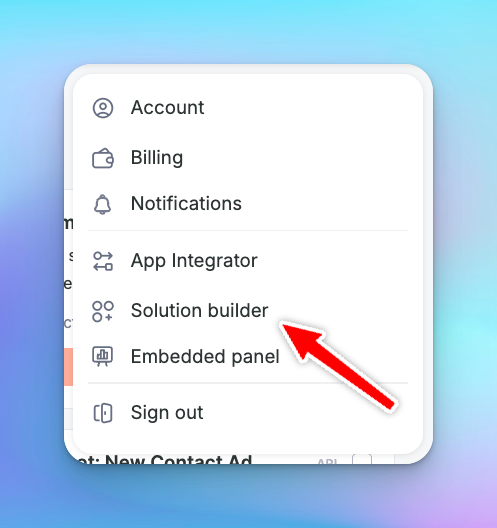
Solution Buildervia the menu in the upper right corner:
- Create a new solution, add templates to it, each linked to one of the created Automations.
- Configure credentials and variables that the user must fill in during installation.
- Save and publish the solution for use within the company or for clients.
Updated about 1 year ago